

From Static Measurement Tool to a Connected Estimating System: Redesigning PlanHub's Takeoff Suite
This case study dives into the challenges, solutions, and outcomes of redesigning a construction estimating workflow spanning three connected tools.

PlanHub is a construction bid management platform used by contractors and subcontractors to find work, estimate jobs, and manage bids. This case study covers a full redesign of three connected tools inside PlanHub’s Takeoff suite: the Takeoff Tool (a simplified, AutoCAD-like measurement tool for reading construction plans), Project Estimates (where measurements become priced line items), and the Formula Builder (a custom calculation engine for assemblies and cost items).
These three tools form one continuous workflow. A measurement taken in Takeoff flows directly into Estimates, and Estimates rows can pull from Formula Builder calculations to convert raw measurements into billable quantities. Rather than treating each as a standalone redesign, this project treated the full path, from measurement, to priced line item, to custom calculation, as a single system that had to work together.
I designed all three tools end to end: research, wireframes, high-fidelity UI, and design-to-dev handoff, working directly from real product usage and support feedback to identify where the existing tools were breaking down for contractors.
Role:
Sole UX/UI designer
Industry:
Construction Tech, SaaS, Bid Management
Tools:
Figma, FigJam, Zoom, Jira
Duration:
Jan 2023 – Nov 2024
Contractors bid on tight margins and tighter timelines. Every extra click, every re-drawn measurement, and every miscalculated formula in the estimating process either costs time the team doesn’t have or introduces risk into a number a client is going to hold them to. The legacy versions of these three tools were functional, but each had accumulated friction that compounded across a single estimate:
User benefits targeted by this redesign
- Faster, more forgiving measurement-taking (the ability to fix mistakes instead of starting over)
- Less manual, repetitive data entry across estimates
- Confidence that a custom formula is correct before it’s applied to a real bid
- A workflow that feels like one connected system instead of three separate tools bolted together
Business benefits targeted by this redesign
- Fewer estimating errors reaching client-facing bids
- Reduced support burden from usability gaps (missing undo, no move tool, disruptive error modals)
- Feature parity with the CAD and spreadsheet tools contractors were used to, lowering the barrier to switching to PlanHub
- A more scalable foundation (formula reuse, custom variables) as PlanHub’s cost-item library grows
The redesign followed a contractor through the full lifecycle of a single bid
STEP 01
Upload Plans
The contractor imports construction drawings into the Takeoff tool and calibrates the scale against the blueprint, creating an accurate foundation for all measurements.
STEP 02
Create Takeoffs
Measure areas, lengths, volumes, and counts directly on the plans. Measurements can be moved, copied, reordered, edited, or undone as the project evolves.
STEP 03
Generate Estimates
Completed measurements flow directly into the Estimates workspace where they become line items linked to cost items, materials, and assemblies.
STEP 04
Apply Formulas
When raw measurements need conversion into billable quantities, saved formulas transform measurements into pricing-ready values using the Formula Builder.
STEP 05
Review & Submit
Review, organize, adjust, and validate the final estimate before finalizing pricing and sending the completed proposal as a professional, client-ready bid.
Because these three tools were previously built and updated somewhat independently, a contractor's mental model of "one job, one number" didn't match how the product actually behaved. The redesign's biggest structural goal was closing that gap, so a change made in Takeoff is traceable all the way through to the final bid total.
SLOW, RIGID, AND MISSING BASIC EDITING TOOLS: THE LEGACY TAKEOFF WORKFLOW
The original Takeoff tool let users measure plans (Area, Linear, Volume, Count) and push those measurements into estimates, but the editing experience stopped there. Once a measurement was drawn, it was effectively locked in place, closer to a static markup tool than something built for iterative, professional takeoff work.
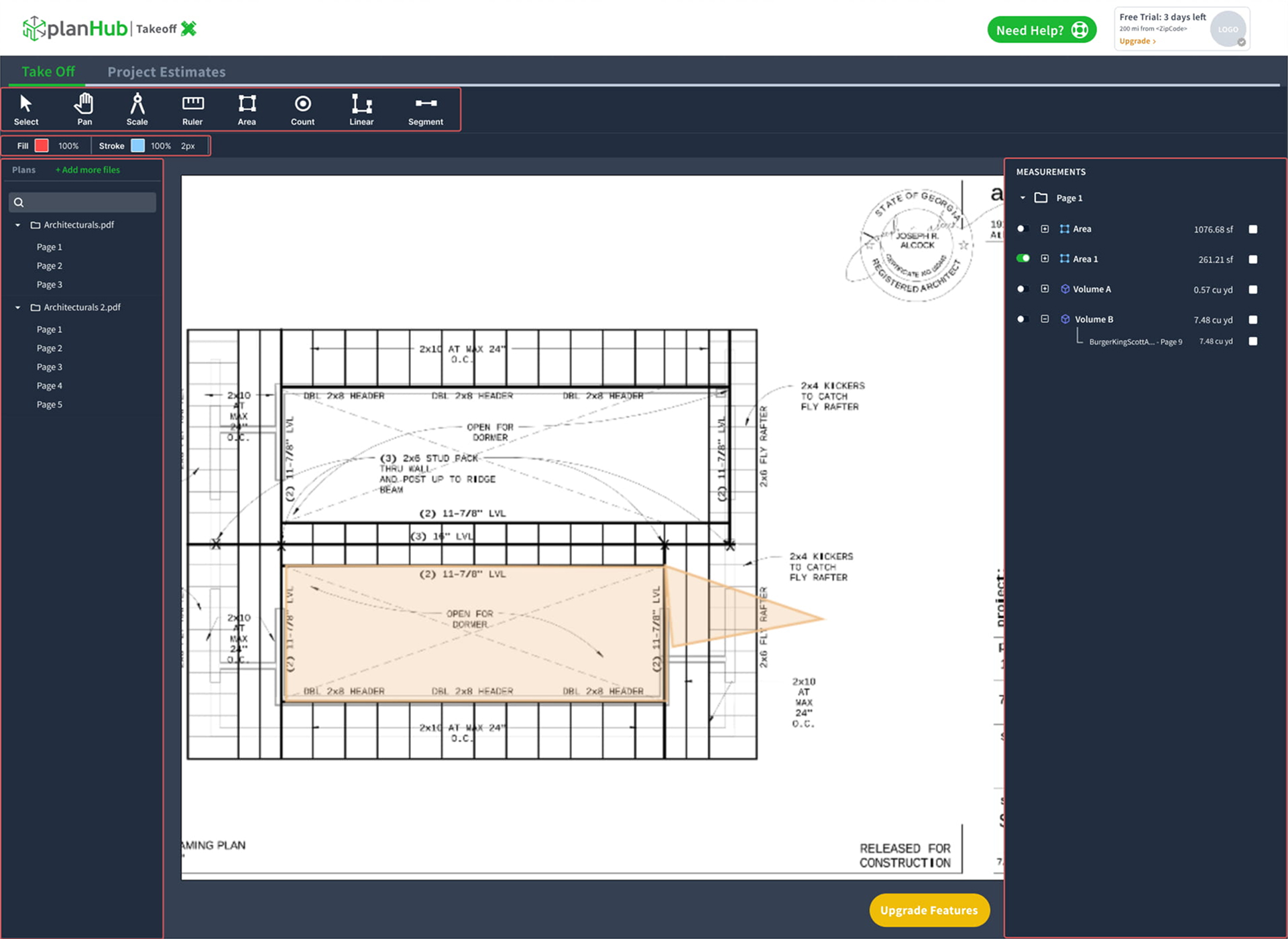
No editing tools beyond the basics. The toolbar stops at Segment: no move, undo, redo, copy/paste, or layering, so any positioning mistake meant deleting and redrawing from scratch.
No scale calibration. The Scale tool exists, but nothing in the interface confirms a plan is measured against its actual scale, a direct path to estimating errors in the client bid.
Measurements are locked in place. Once an area is drawn, it can’t be re-positioned or reordered against overlapping shapes.
No bulk actions or visibility control. Every measurement had to be managed one at a time, with no way to hide clutter on a busy plan or apply a change to more than one item at once.
The original Takeoff tool let users measure plans (Area, Linear, Volume, Count) and push those measurements into estimates, but the editing experience stopped there. Once a measurement was drawn, it was effectively locked in place, closer to a static markup tool than something built for iterative, professional takeoff work.
How I got there
A takeoff tool is only as trustworthy as its measurements, so I prioritized fixes in order of error risk: scale calibration first, then the core editing affordances users expect from any drawing tool (move, undo, copy/paste, layering).
In parallel, I explored a tool-consolidation pattern: grouping related tools like Area/Line/Curve into a single button with a drop-down of states, to keep the toolbar from sprawling as more tools got added in v.2.
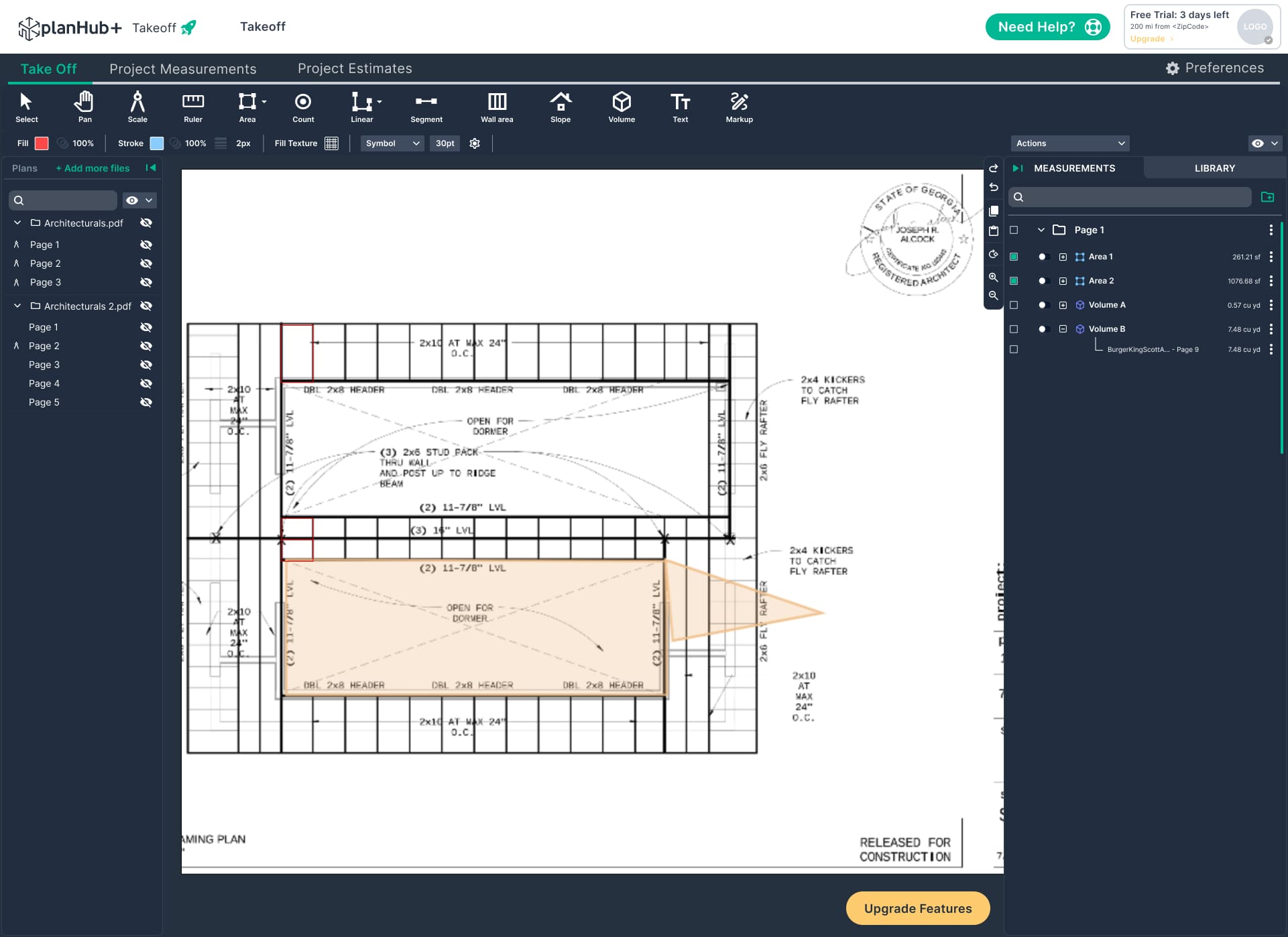
The redesigned tool gives users full control over their measurements after the fact: drag to reposition, undo mistakes instantly, duplicate repeated elements, reorder overlapping shapes, and calibrate scale before measuring, closing the accuracy gap between what's drawn and what's billed, and bringing the tool closer to parity with the professional CAD tools contractors were used to.

Final design
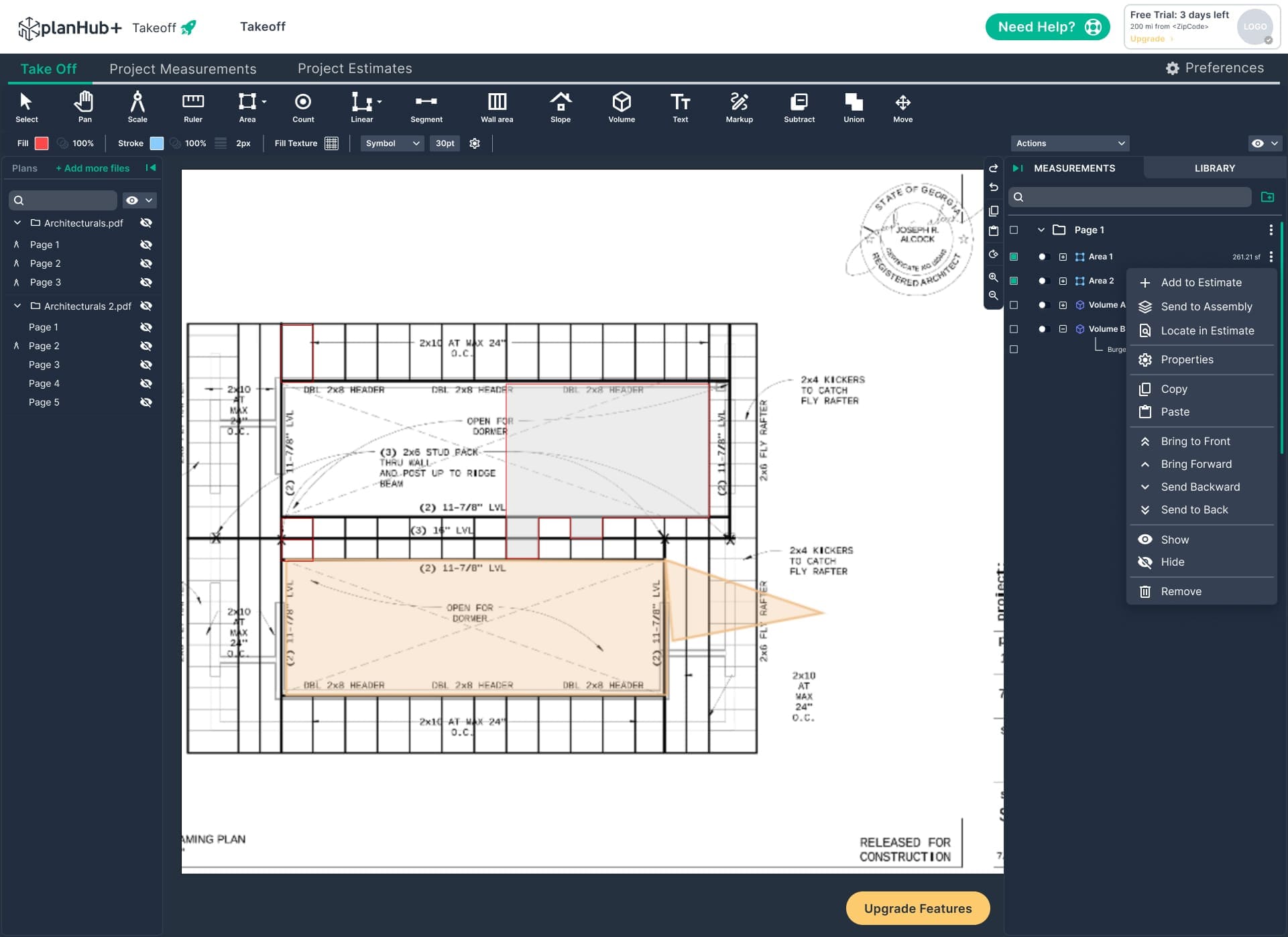
The redesigned tool gives users full control over their measurements after the fact: drag to reposition, undo mistakes instantly, duplicate repeated elements, reorder overlapping shapes, and calibrate scale before measuring, closing the accuracy gap between what’s drawn and what’s billed, and bringing the tool closer to parity with the professional CAD tools contractors were used to.
Refreshed Visual System
Updated the overall interface with a cleaner, more consistent visual language focused on usability and efficiency. The previous toolbar used flat styling and low-contrast elements that made tools harder to identify and interactions less intuitive.
The refreshed system introduced clearer active states, improved spacing, and refined iconography to create stronger visual hierarchy and better feedback. These updates made controls easier to scan, improved tool discoverability, and created a more modern, accessible experience while providing a stronger foundation for future interface improvements.
Beyond the core editing tools, the redesign also addressed how users manage a growing list of measurements on a busy plan, improving organization and reducing friction as projects become more complex.
The result: a clearer, more efficient workflow that helps users stay focused on the job rather than managing the interface.
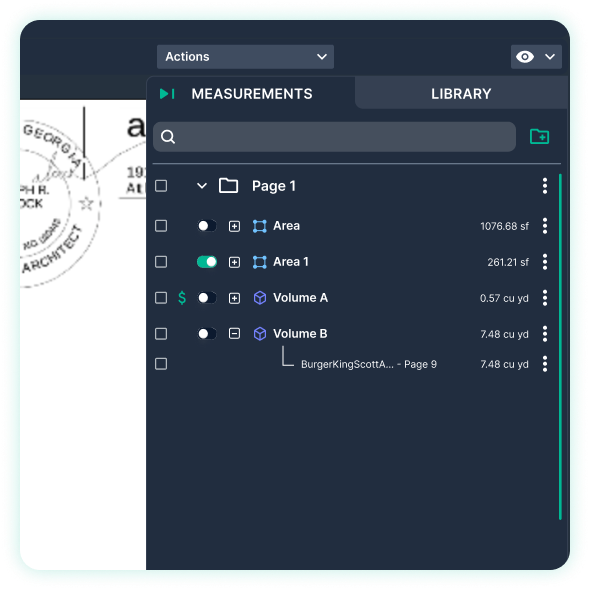
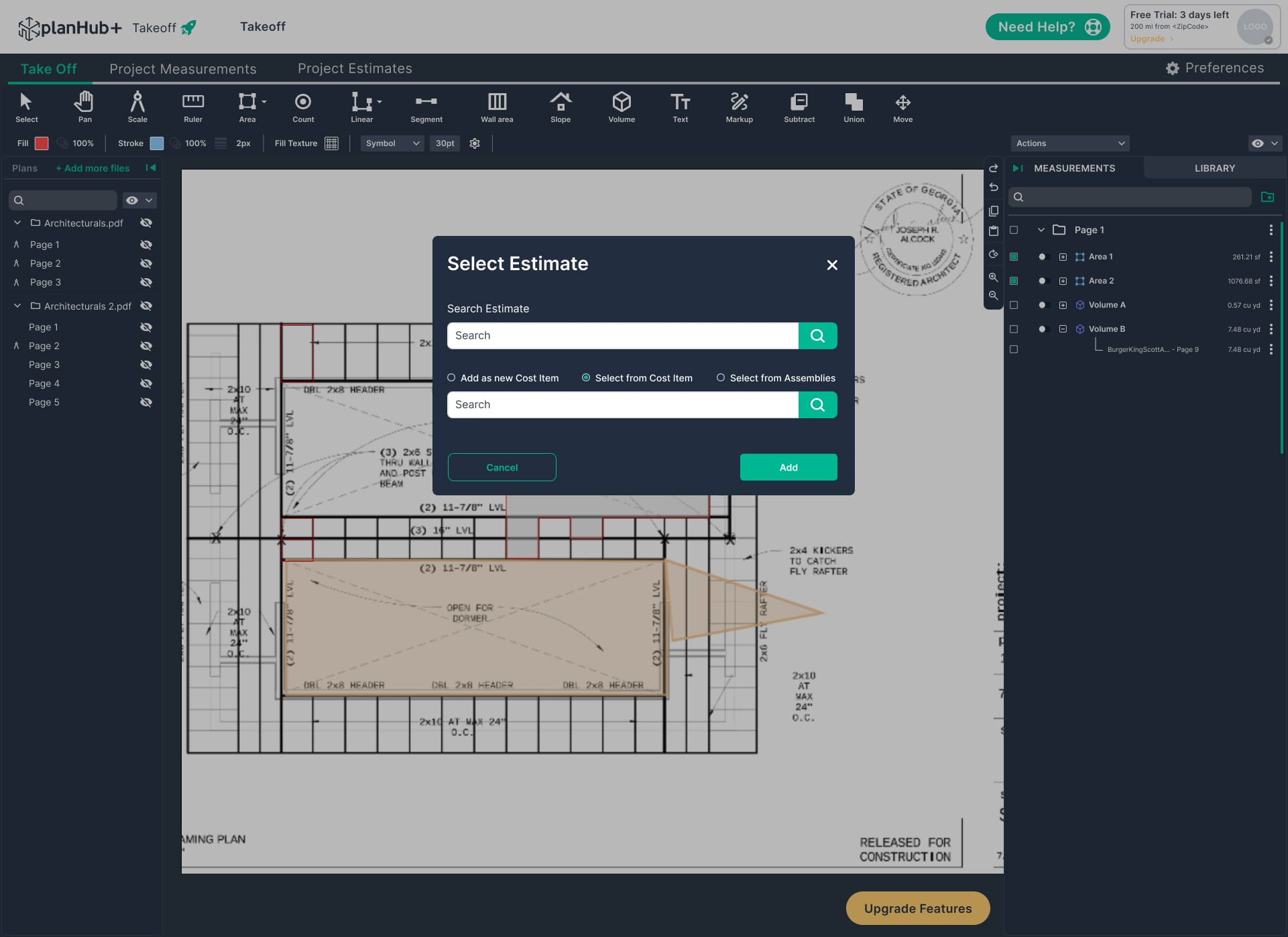
Introduced a dedicated Actions menu and row-level selection checkboxes, allowing users to update multiple measurements at once. Users can now add items to estimates, group measurements, or remove selections without repeating the same action individually.
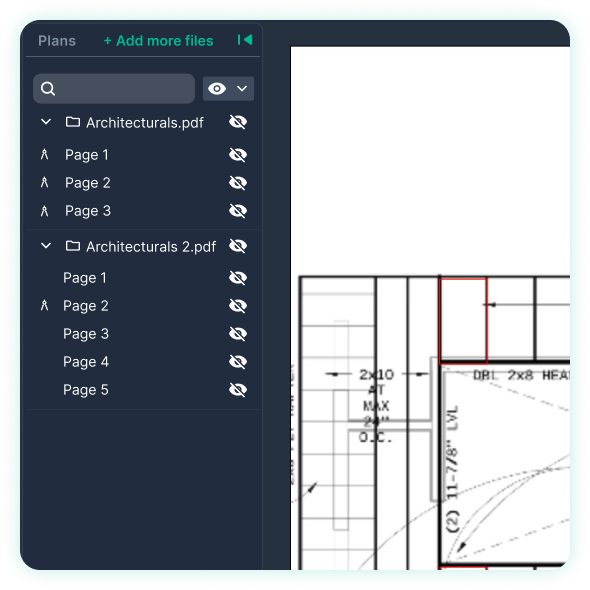
Added visibility controls at the plan, page, and measurement levels, giving users greater control over canvas organization. Users can reduce visual clutter while keeping important data intact instead of permanently deleting elements.
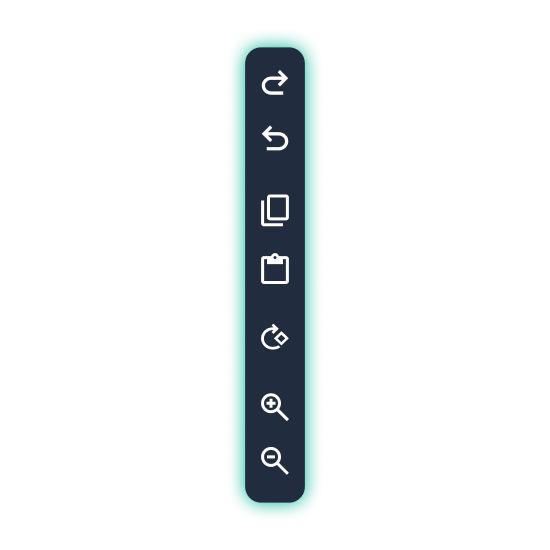
Created a dedicated editing control rail that keeps essential actions like Undo, Redo, Copy, Paste, Rotate, and Zoom easily accessible alongside the canvas, replacing previously unavailable or difficult-to-find tools.
Brought core editing UX to feature parity with industry-standard takeoff tools, reducing the learning curve for contractors switching from AutoCAD-based workflows
A RIGID, ONE-SIZE-FITS-ALL TABLE: THE LEGACY ESTIMATES VIEW
Once measurements left the Takeoff tool, they landed in an estimates table that gave every project the same fixed set of columns, in the same fixed order, with no way to sort, filter, or hide what wasn’t relevant to the job at hand.
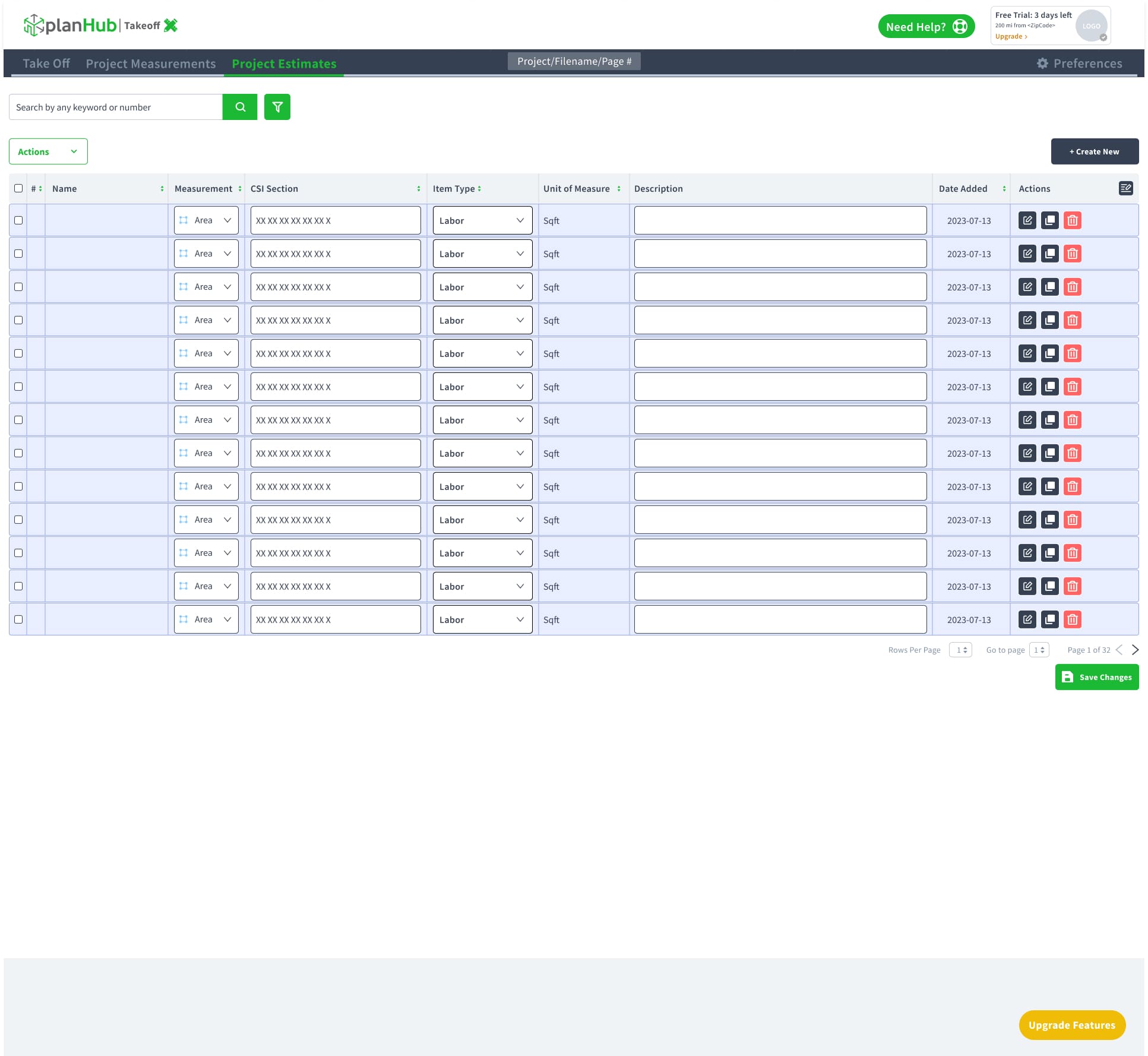
Fixed columns only. Every user saw the same 13 columns regardless of what mattered for their project, with no way to hide noise or surface what they actually needed.
No sorting. Finding a specific cost item in a 32-page estimate meant scrolling and scanning, not searching.
No batch input. Entering values for multiple items meant clicking into each field individually, one at a time.
Disconnected from Takeoff. The link between a measurement drawn on a plan and its row in the estimate wasn’t visually or functionally reinforced, so users had to trust the math rather than trace it.
One estimate per project. There was no way to keep alternate scenarios, such as a base bid and an add-alternate, side by side.
Version 1: the original. A single flat list with a search bar, an Actions menu, and a Create New button. Every row was an always-editable input row, there were no project totals on the page, and a project could only hold one estimate.
How I got there
I took the table through three passes rather than one, with each pass focusing on a different layer of the experience: first structure, then clarity, and finally speed, making the interface easier to scan and use.
Design evolution and refinement
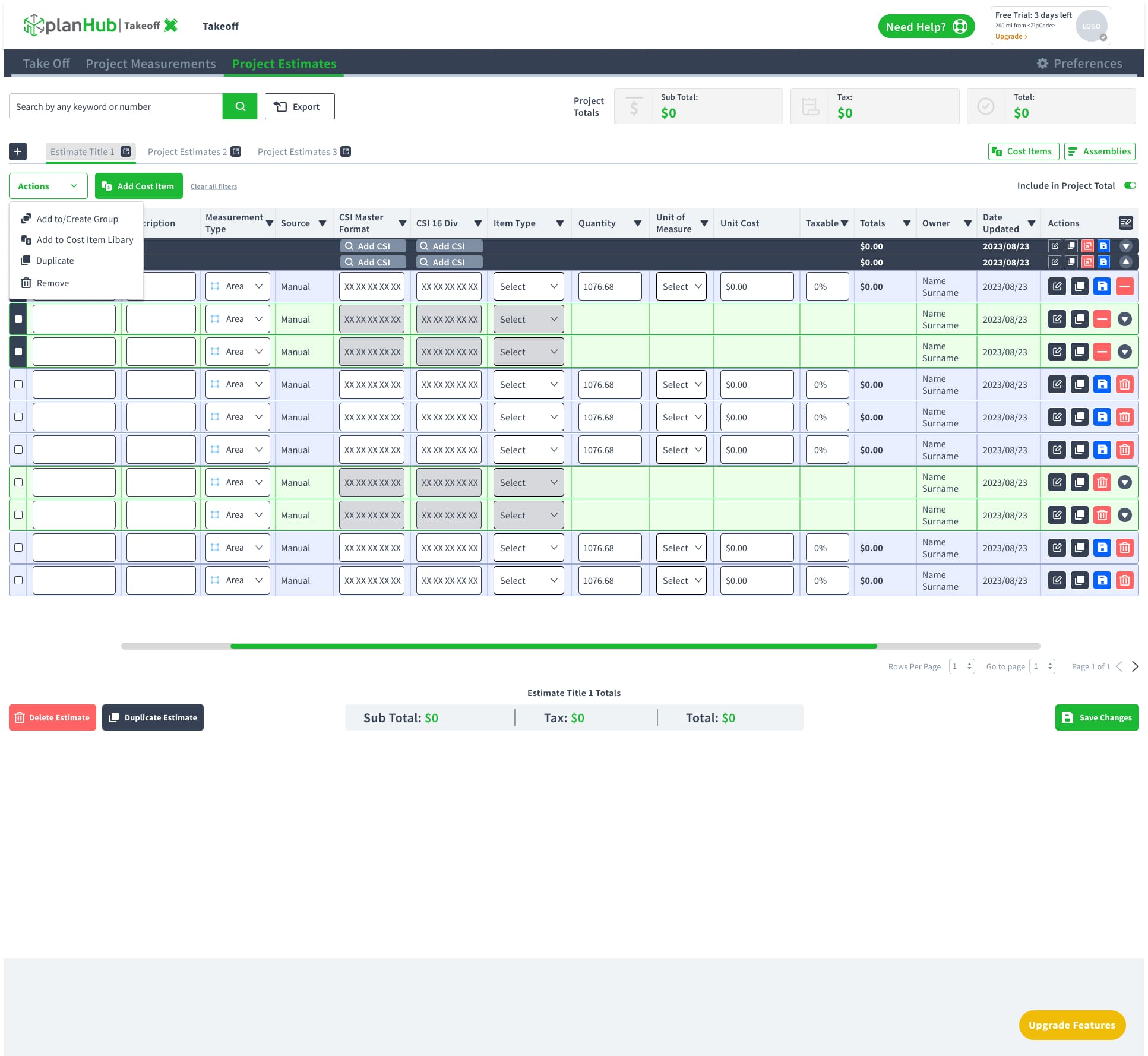
This pass focused on improving the overall structure of the experience. I introduced Project Totals (subtotal, tax, and total) at the top to give users immediate visibility into project costs, along with estimate tabs so a single project can contain and manage multiple estimates.
I also added quick access to Cost Items and Assemblies, making it easier to navigate between commonly used resources. An Actions menu with bulk operations (add to group, add to cost item library, duplicate, and remove) was introduced to streamline repetitive tasks and improve efficiency.
The table itself was expanded with Source, CSI Master Format, CSI 16 Div, Owner, and Date Updated columns to provide more context for each item.
To accommodate the additional information while preserving readability, a horizontal scroll bar was added, allowing users to access the expanded dataset without compromising the overall layout.
The redesigned Estimates view gives users control over how they see and manage their data: sort any column, show or hide fields that don’t apply to the job, batch-enter values instead of clicking field by field, and view items grouped by Assembly for a clearer cost breakdown.
The result: a faster, more flexible estimating workflow with improved visibility and confidence in every number.
All while staying directly tied back to the Takeoff measurements that generated them, ensuring accuracy and traceability from measurement through bid.
This pass focused on improving clarity and speed, making everyday tasks more intuitive and efficient. The accent color was updated from green to the suite’s teal brand color, creating a more consistent visual experience across the product.
A new Adjust Rates action allows users to update pricing in bulk, reducing repetitive manual edits, while Insert Values buttons let users quickly enter measurements directly within each row without interrupting their workflow. Grouped rows now use muted fields to clearly distinguish editable and non-editable content, making the table easier to scan and understand at a glance.
Finally, a column settings icon was added to the table header, giving each user the flexibility to show or hide fields based on their workflow and preferences, reducing visual clutter while keeping important information easily accessible.
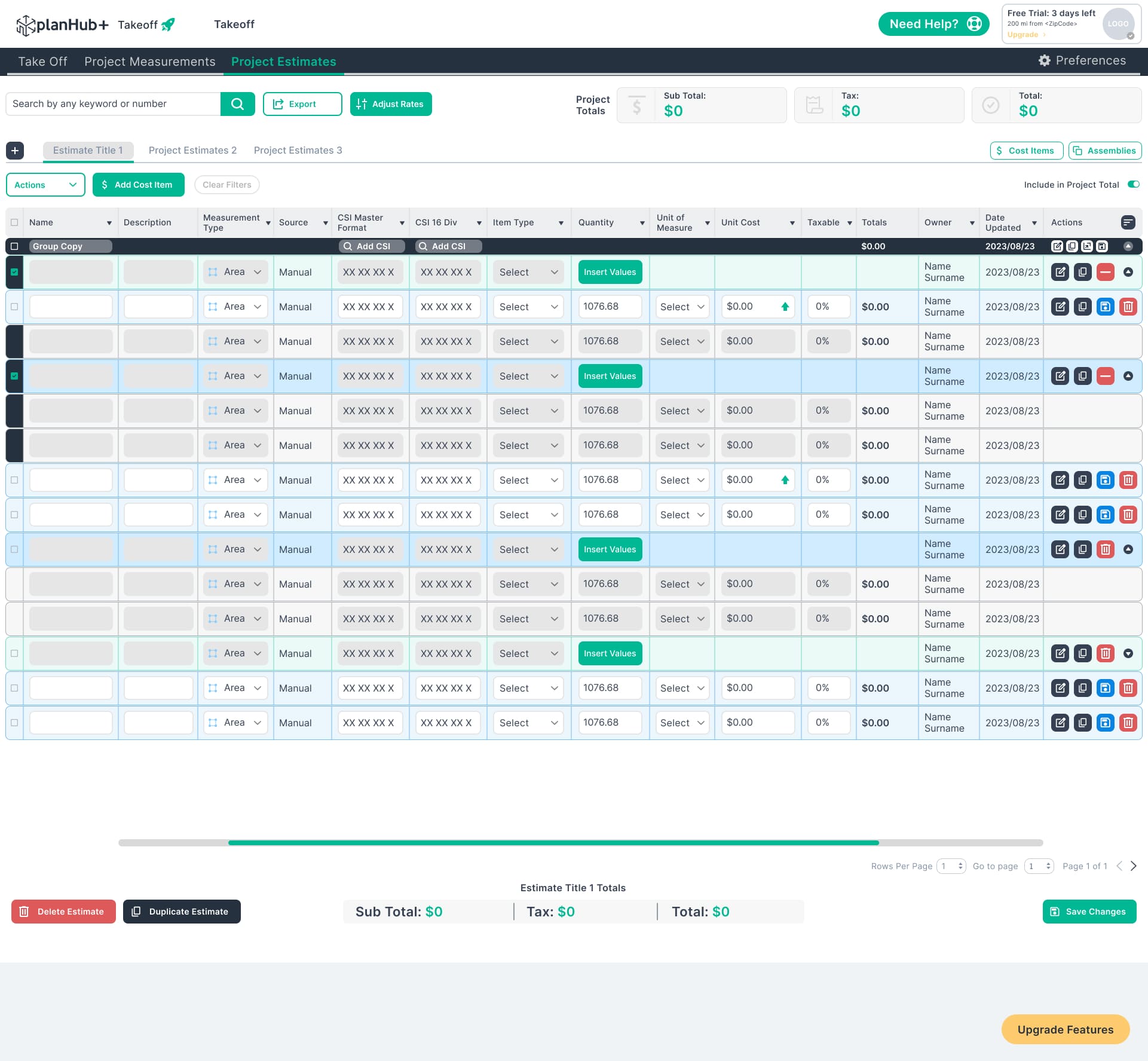
Closed the workflow gap between Takeoff and Estimates, creating a more connected experience that reinforces measurement accuracy and maintains data consistency from start to finish.
FROM A TYPED STRING TO A TESTABLE SYSTEM: REBUILDING THE FORMULA BUILDER
The original editor, called the Interview Formula, let estimators build a calculation out of chips, but the way it was laid out worked against them.
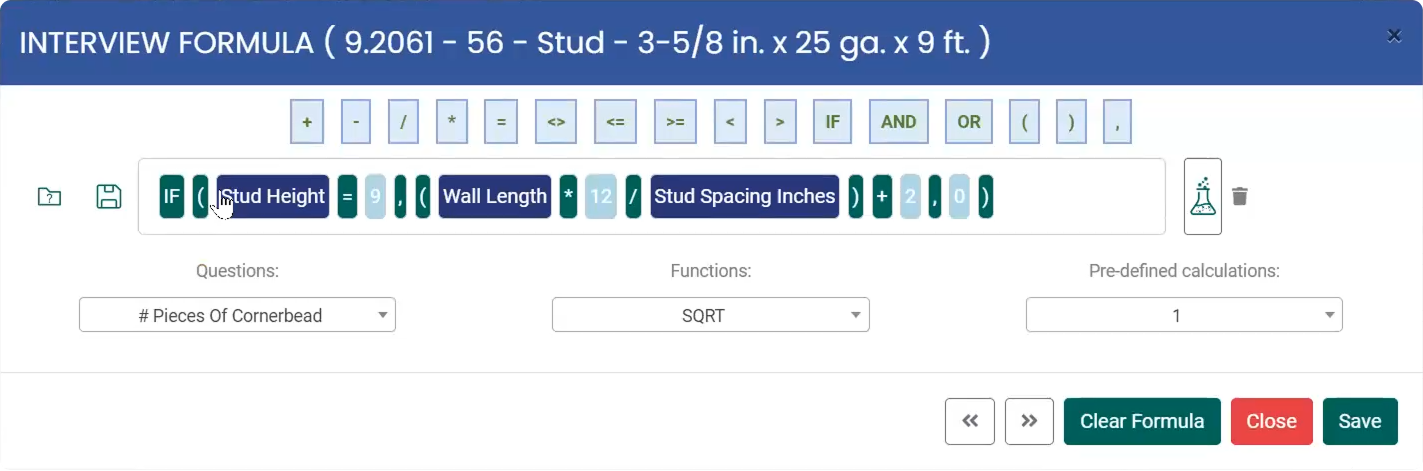
Out of step with the suite. A bright blue header and white body clashed with the dark Takeoff interface, so the editor felt bolted on rather than part of one product.
Unlabeled, icon-only actions. Save, test, and delete were small icons with no text, so users had to guess what each one did.
Everything behind dropdowns. Questions, Functions, and Pre-defined calculations each sat in a separate dropdown, so building a formula meant opening menus just to see what was available.
One flat row of operators. Math, comparison, and logic operators (+, <>, IF, AND, OR) shared a single row and a single style, with nothing to signal which group a symbol belonged to.
Low-contrast chips. Number chips used white text on pale blue, which made values like 9 and 12 harder to read at a glance.
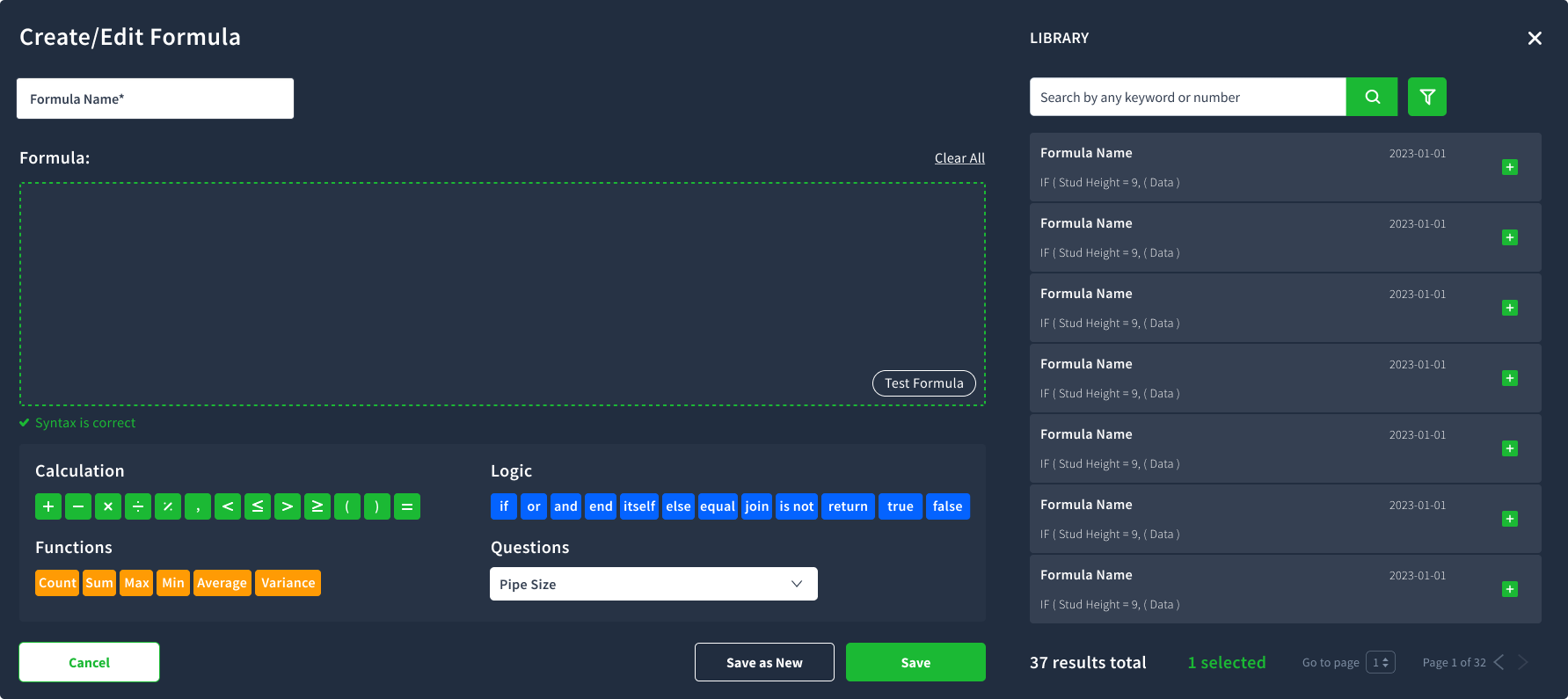
<>, <=, >=) became readable words such as if, and, or, equal, and is not, and Functions moved out of a dropdown into visible chips (Count, Sum, Max, Min, Average, Variance).Actions gained labels (Test Formula, Clear All, Save as New), a live Syntax is correct indicator sat under the formula, and a searchable Library panel appeared beside the editor, showing each saved formula’s name, date, and preview with a one-click insert
A Dimension input with separate Feet and Inches fields and a Descriptive Text field let users add real-world values and notes, alongside a Round Up Result option.
Before anything is saved, Test Formula opens a panel where users enter sample values (Area in Square Feet, Length in Feet and Inches) and see the Result, and errors appear inline instead of in modal popups. Apply To Cost Item is now the clear primary action in the footer.
Turned formula-building from a one-shot, unverifiable action into a reusable, testable system
Taken together, these three redesigns turned PlanHub’s Takeoff suite from a set of loosely connected, error-prone tools into a single, traceable workflow: a measurement taken on a plan can be moved, corrected, and calibrated with confidence; that measurement flows into an estimate that’s sortable, filterable, and fast to review; and any custom calculation applied to it can be tested, saved, and reused rather than rebuilt from scratch every time.
The result: a faster, more reliable takeoff-to-bid workflow that gives contractors confidence in every number they produce.
The process now matches how contractors actually think about a job: one continuous chain from plan to number, not three separate tools they have to reconcile by hand.