

Enhancing Small Business Resilience Through Proactive Security Design
A proactive cybersecurity service designed to uncover vulnerabilities, reduce risk, and empower small businesses with clear, actionable security insights.
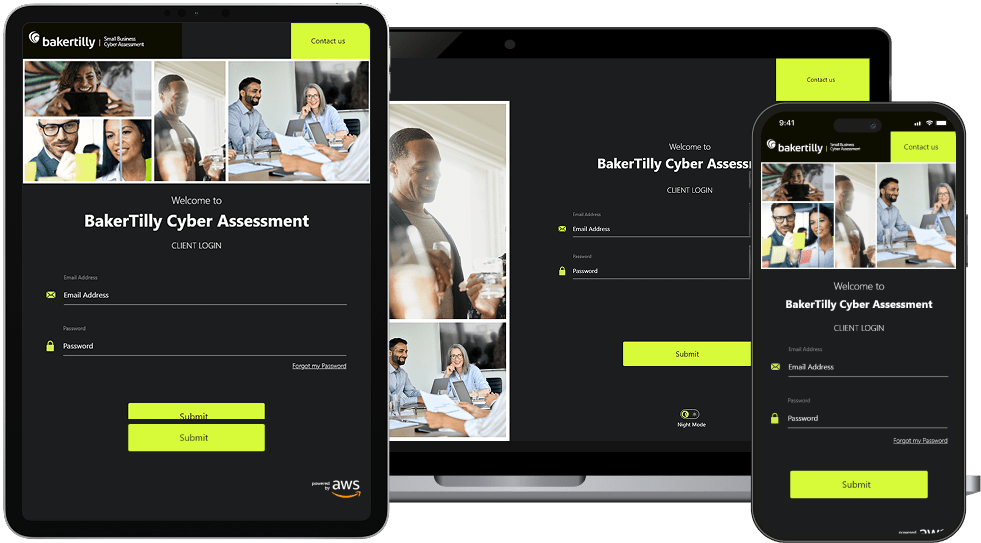
Baker Tilly Small Business Cyber Assessment is a service designed to help small businesses identify and address cybersecurity risks. It evaluates vulnerabilities across critical areas including data storage, system access, and backup processes, delivering actionable recommendations to strengthen security posture.
This assessment is tailored to the unique needs of small businesses, ensuring they can proactively protect their assets, minimize exposure to cyberattacks, and operate with greater confidence in their digital infrastructure.
Role:
Sole UX/UI Designer + Brand Designer
Industry:
Cybersecurity
Tools:
Figma, Adobe XD, Zoom
Duration:
April 2022 – July 2022
Value Added +
- Transformed a compliance-heavy process into a clear, guided, and approachable user experience
- Established a responsive design system that performs consistently across desktop, tablet, and mobile
- Reduced drop-off by embedding progress indicators, contextual guidance, and real-time validation throughout the flow
- Built trust at every touchpoint through intentional visual hierarchy, security-forward UI, and professional brand alignment
- Delivered a platform experience that serves non-technical users with confidence and clarity
Goals Achieved 𖣠
- Simplified complex compliance workflows without sacrificing accuracy or completeness
- Eliminated ambiguity at every stage of the multi-step assessment flow
- Strengthened user trust through consistent visual language and security-conscious design decisions
- Established cross-device parity so every user receives the same quality of experience regardless of screen size
- Created a scalable interaction framework adaptable to future assessment types and platform expansions
- Proved that regulatory and compliance platforms can be both functionally rigorous and genuinely user-friendly
I was entrusted with designing key screens for the Baker Tilly Small Business Cyber Assessment, a platform built to guide small business owners through a structured, accessible cybersecurity evaluation. Working as the sole UX/UI and Brand Designer, I owned the design process across interaction design, visual design, responsive layouts, and brand alignment. Every decision was made with the goal of making a complex, compliance-driven process feel approachable, clear, and trustworthy for users who may have little to no technical background.
My work spanned the full user journey, from the first point of authentication to final confirmation, requiring a careful balance between regulatory clarity and usability. The platform needed to perform consistently across desktop, tablet, and mobile, making responsive design a core requirement rather than an afterthought.
My responsibilities included designing:
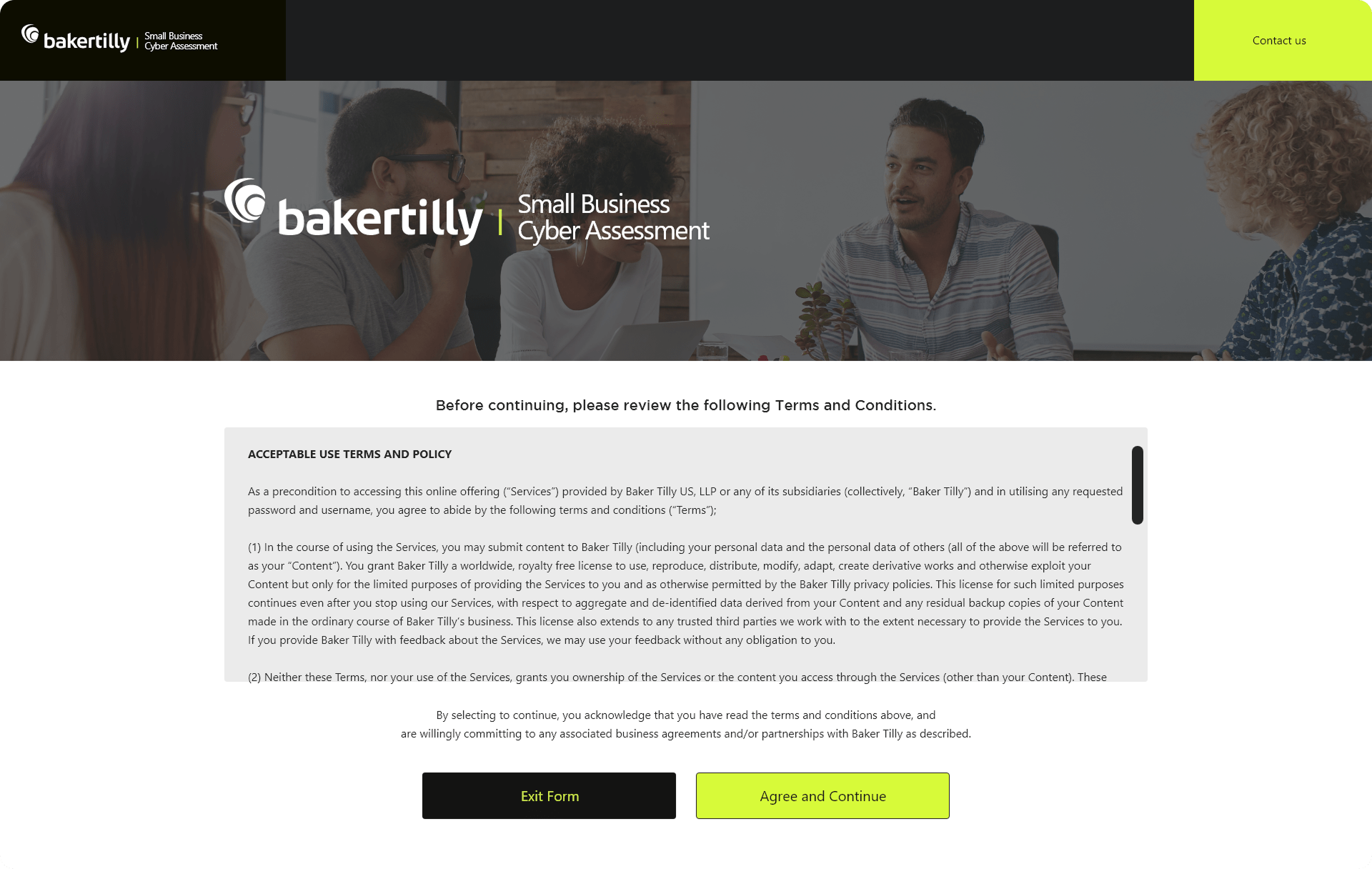
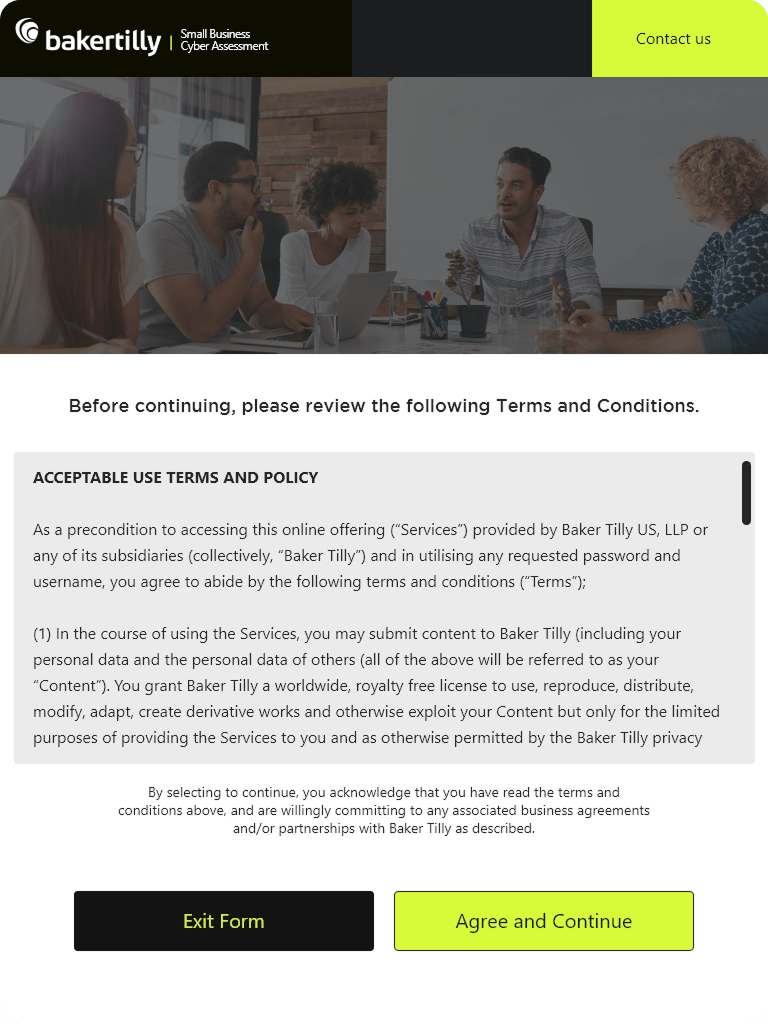
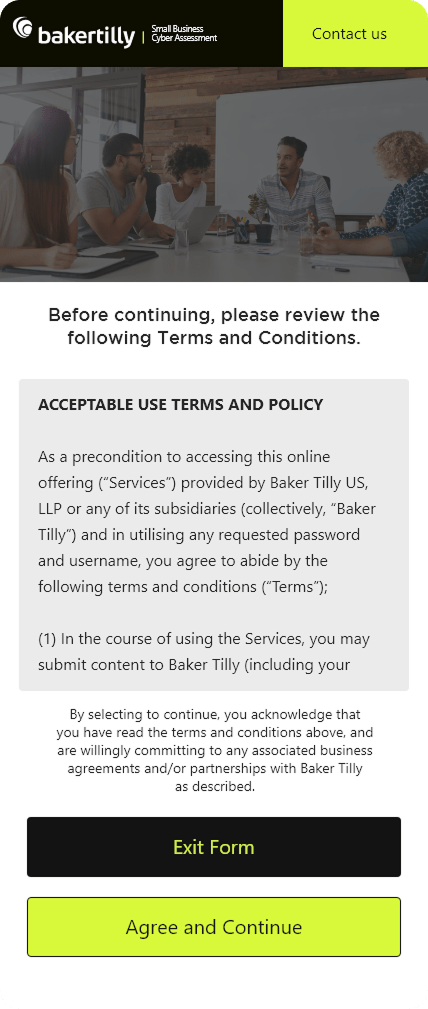
Terms and Conditions Screen: Structured for clarity and scannability, ensuring users could review and consent with confidence.
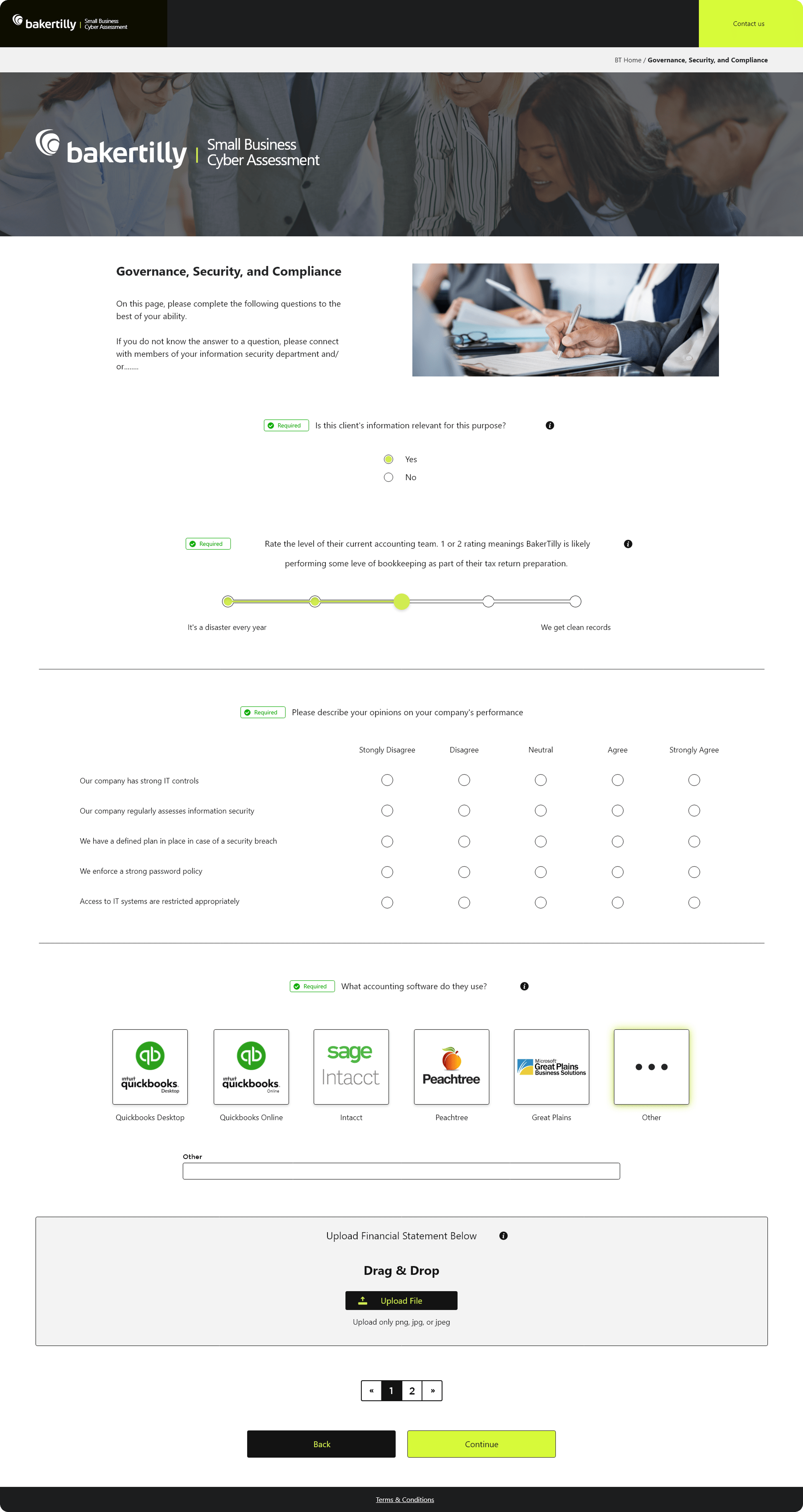
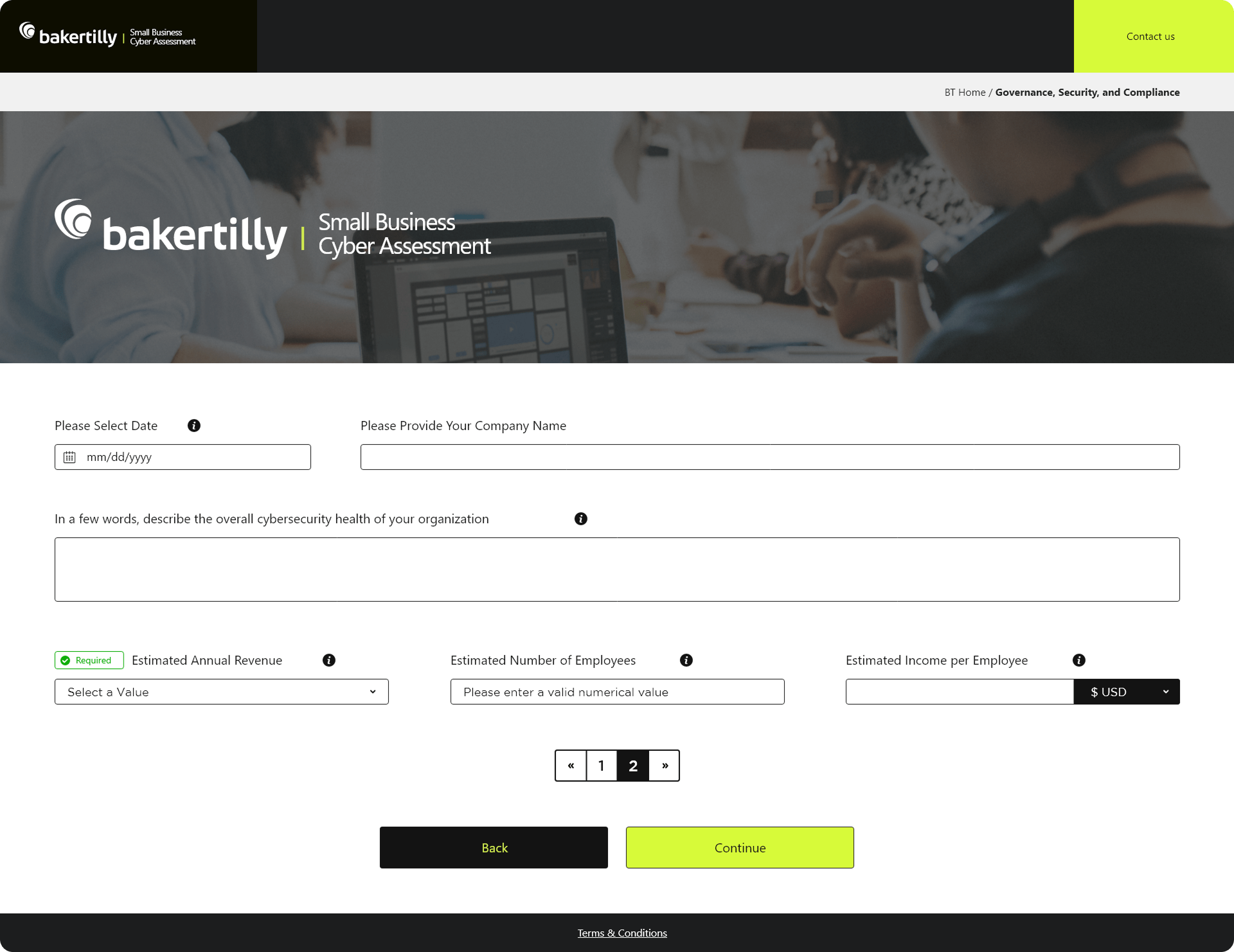
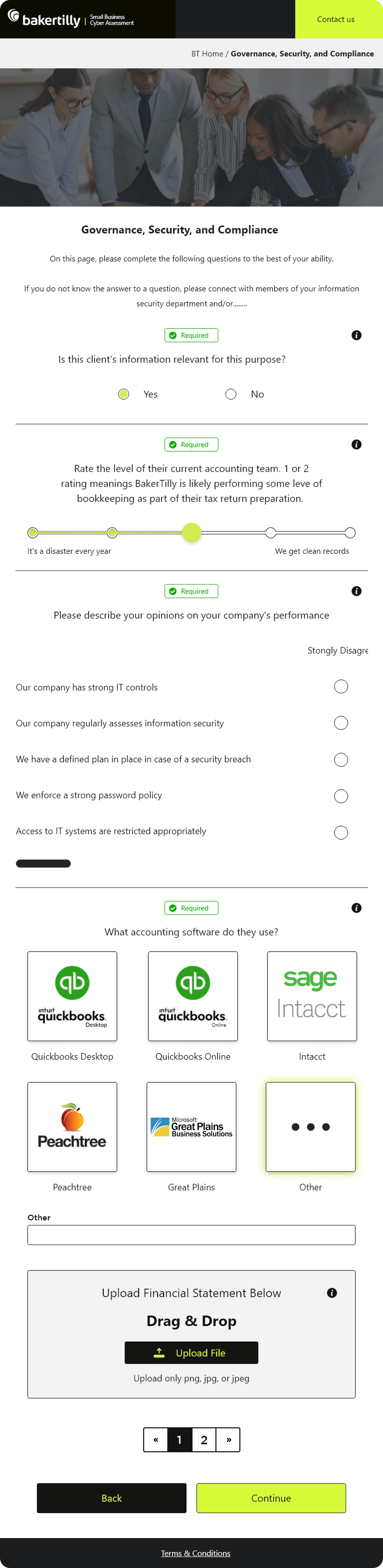
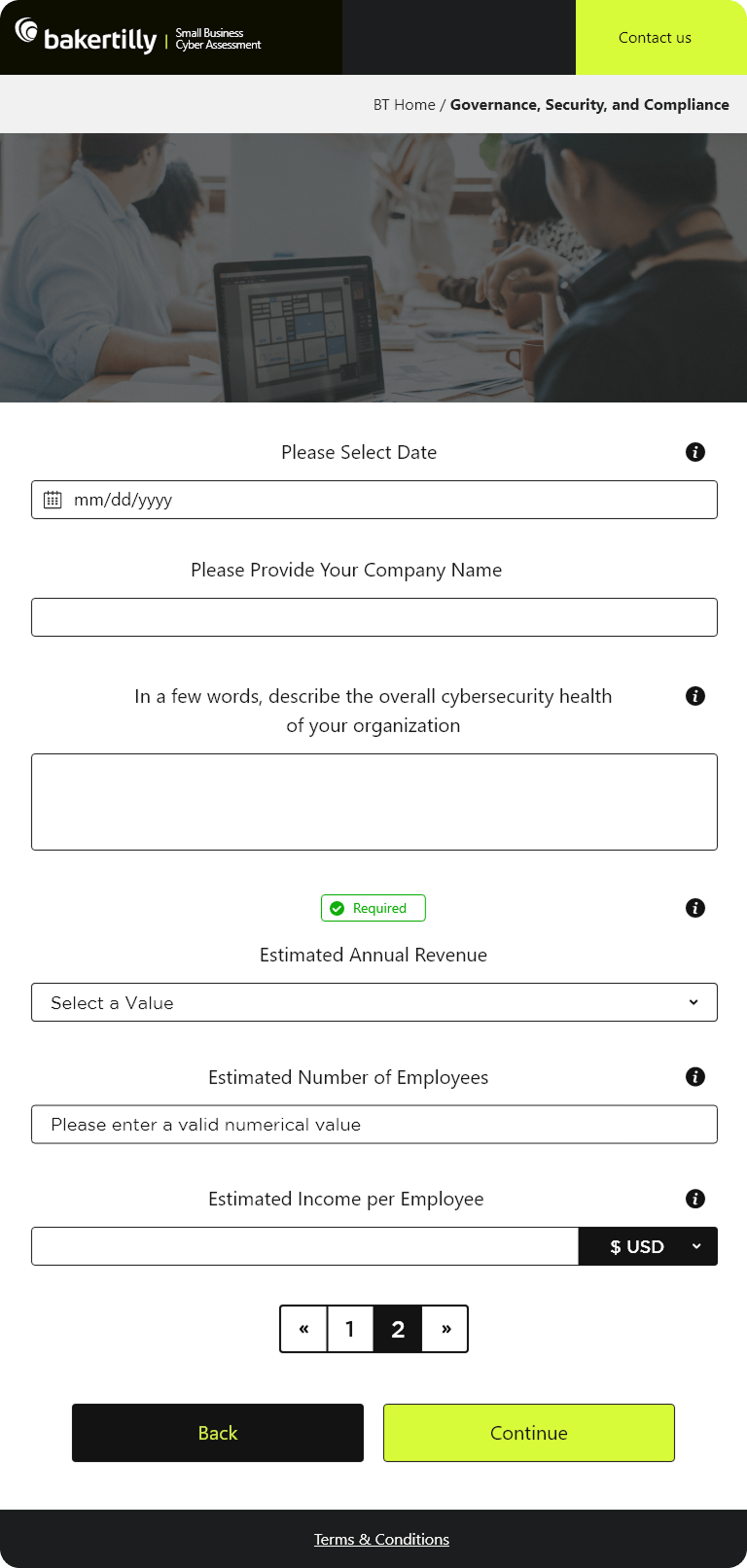
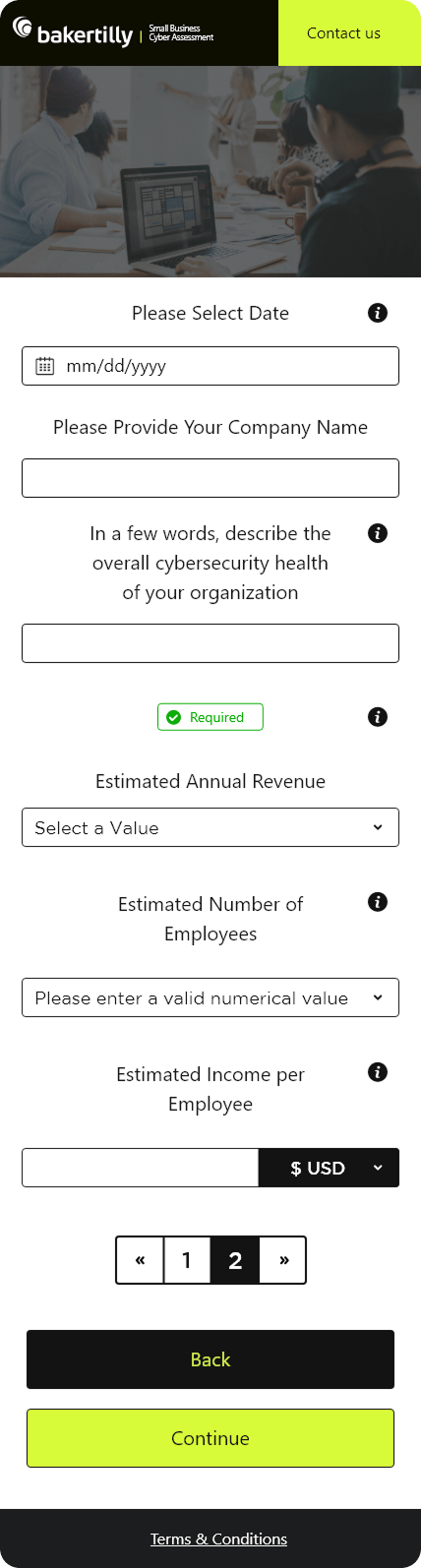
Questionnaire Screen: Designed as a guided, step-by-step flow with progress indicators and contextual prompts to support accurate, low-friction data collection.
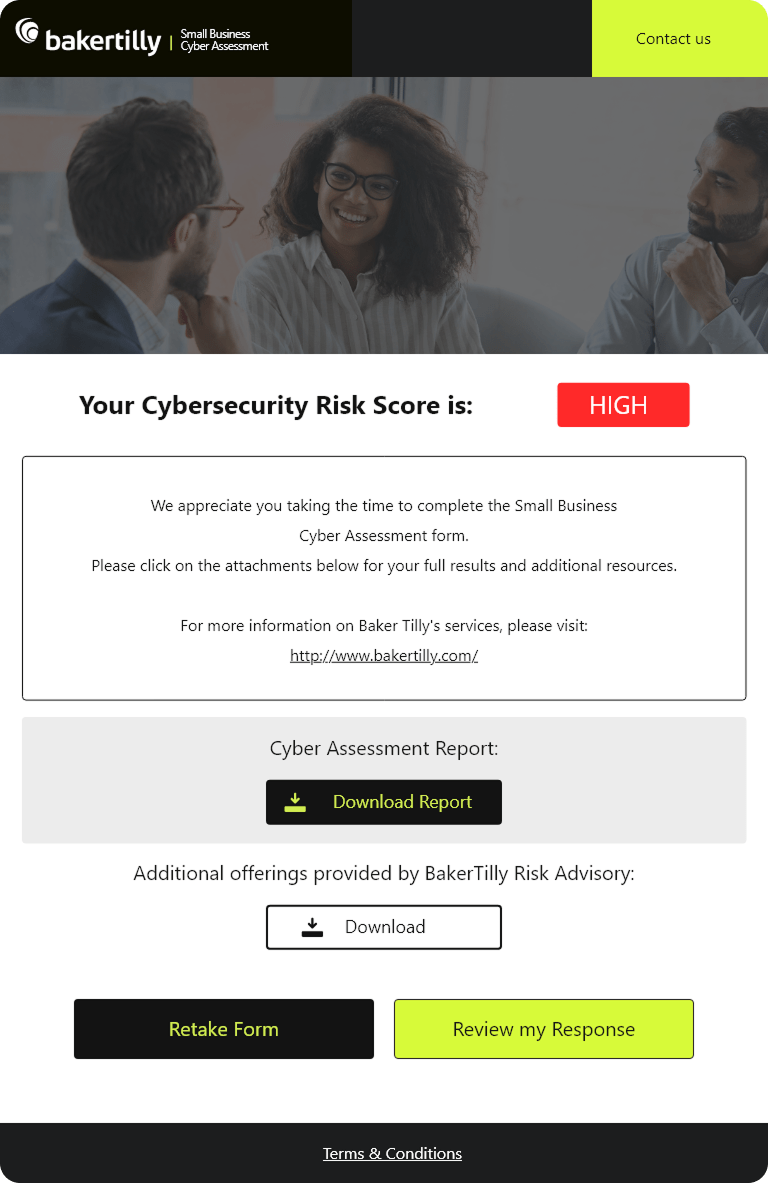
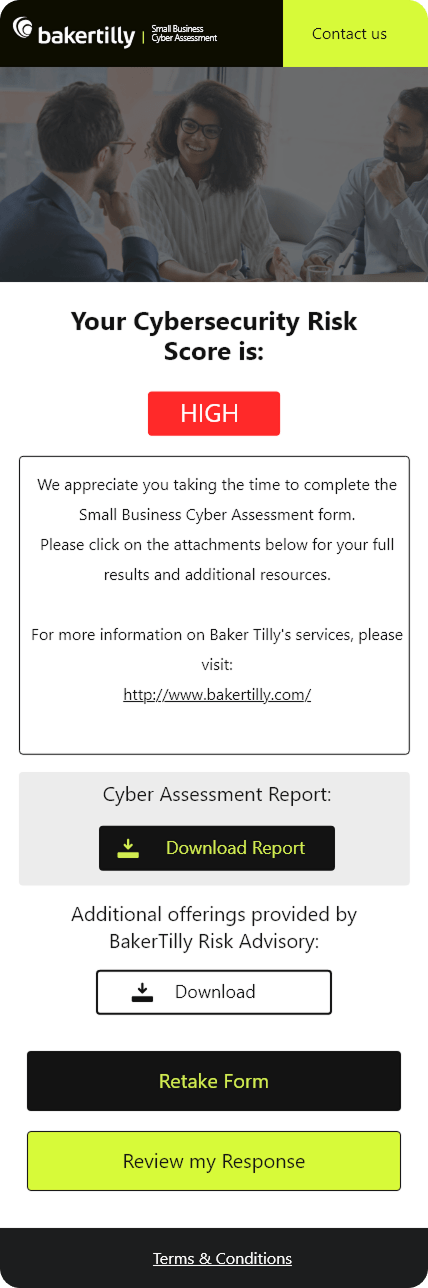
Confirmation Screen: Crafted to deliver a clear, reassuring sense of completion and next steps.
Pain Points Identified:
- No clear entry-point experience to orient users unfamiliar with cybersecurity assessments
- Terms and conditions content presented without structure, making it difficult to read and parse
- Questionnaire flow lacked guidance, leaving users uncertain about what was required and why
- No progress visibility, causing users to lose context during multi-step data entry
- Poor cross-device experience, with layouts that broke down on tablet and mobile
- Absence of real-time validation meant errors were only surfaced after submission
- Inconsistent visual language undermined trust on a platform handling sensitive business data
Goals:
- Design a clear, confidence-building authentication experience across all devices
- Structure compliance content for readability without sacrificing legal accuracy
- Build a guided, step-by-step questionnaire that reduces hesitation and supports accurate input
- Embed progress indicators and contextual prompts to keep users oriented throughout the flow
- Deliver full responsive parity across desktop, tablet, and mobile
- Implement real-time validation to catch errors at the point of entry, not after submission
- Establish a consistent visual language that communicates professionalism and security
NOTES
To make the Small Business Cyber Assessment both effective and user-friendly, I focused on these key features:
- Clarity: Layouts across the Terms and Conditions and Confirmation screens were designed for immediate readability, using typographic hierarchy and intentional white space to prevent users from feeling overwhelmed by dense content.
- Simplicity: The Questionnaire was broken into discrete, focused steps with progress indicators and plain-language instructions, ensuring users always knew where they were and what came next.
- Visual Consistency: Color, typography, and component styling remain uniform across every screen, maintaining alignment with Baker Tilly’s brand standards and reinforcing professionalism throughout.
- Responsiveness: Dedicated layouts for desktop, tablet, and mobile ensure the experience is never adapted as an afterthought, with touch-friendly inputs and preserved visual hierarchy at every breakpoint.
- Accessibility: Large, readable fonts, high-contrast color choices, and intuitive navigation make the platform usable for all users, including those with limited digital or technical experience.
- User Feedback: Inline validation, error messaging, and success indicators give users immediate, actionable responses to their inputs, reducing uncertainty and minimizing rework.
- Testing & Iteration: Designs were tested across multiple devices and refined through iterative feedback, ensuring every screen performed as intended under real-world conditions.
RESPONSIVE UX SIMPLE, SECURE, AND DEVICE-READY LOGIN EXPERIENCE
A frictionless authentication flow designed to build trust, reduce errors, and perform consistently across desktop, tablet, and mobile.
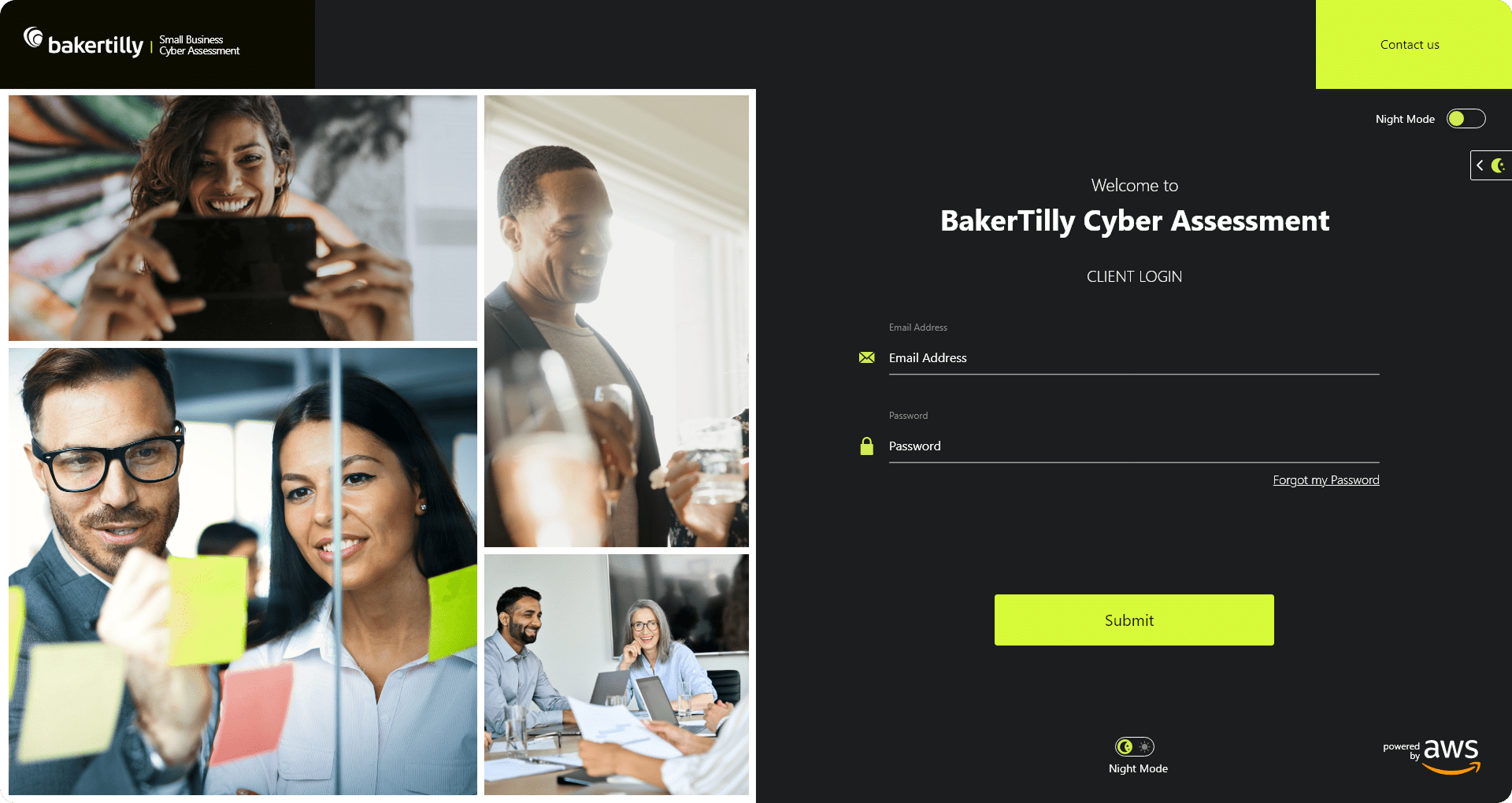
The login experience was designed with a strong emphasis on clarity, accessibility, and user confidence. For small business owners, many of whom may be engaging with a cybersecurity platform for the first time, the authentication screen represents the first test of the platform’s credibility. A confusing or visually cluttered login experience undermines trust before the assessment even begins.
To address this, the design prioritized a clean, focused layout with clearly labeled input fields, an intentional button hierarchy, and a visible security badge to immediately signal that the platform is safe and legitimate. Cognitive load was reduced by limiting the number of required interactions and applying consistent form validation to catch errors early. Every visual element was evaluated against one question: does this make the user feel more confident or less?
UX / UI APPROACH
- User Context & Entry-Point Analysis: Treated the login screen as a high-friction, high-importance moment, prioritizing clarity, speed, and confidence at the first point of interaction.
- Cognitive Load Reduction: Minimized required inputs and applied clear field labeling and real-time validation to help users authenticate quickly and accurately.
- Clear Visual Hierarchy: Used typography, spacing, and color contrast to guide attention toward primary actions and reduce visual noise throughout the screen.
- Trust-Building UI Elements: Integrated visible security indicators and consistent brand styling to reinforce credibility during authentication, a critical factor for a cybersecurity-focused platform.
- Responsive-First Design: Designed desktop, tablet, and mobile layouts intentionally, ensuring touch-friendly inputs, readable typography, and consistent hierarchy across all breakpoints.
- Outcome-Driven Decisions: Every UX and UI choice was evaluated against measurable goals, including reduced login errors, faster time to entry, and improved mobile success rates.
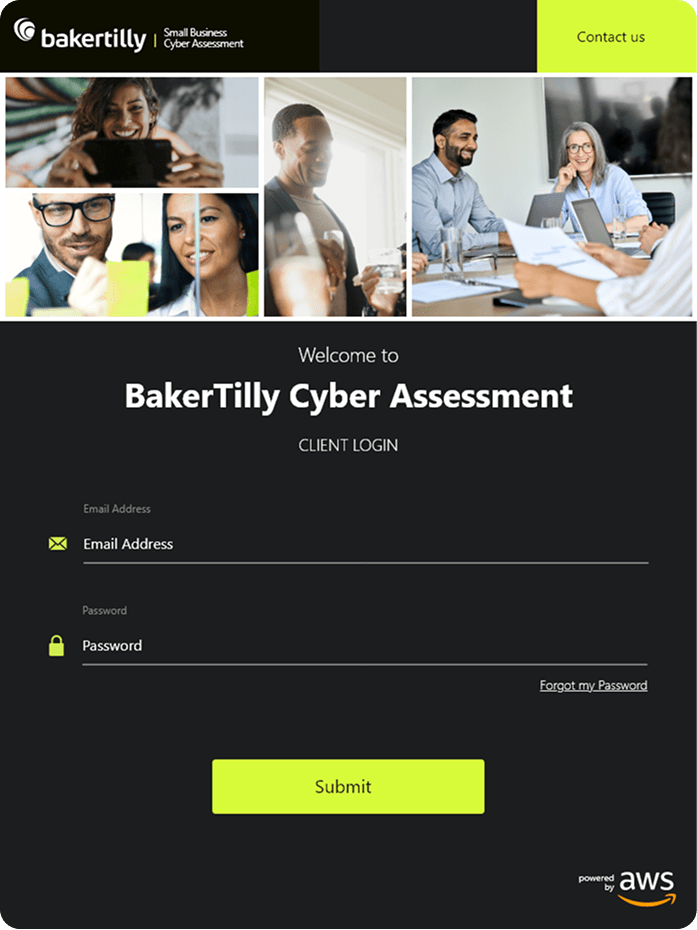
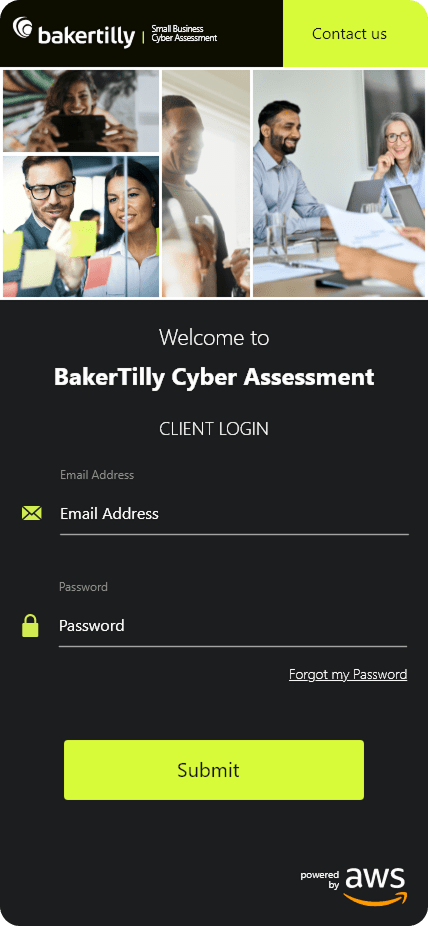
The experience was fully responsive, with dedicated tablet and mobile layouts designed to maintain consistency, usability, and performance across all breakpoints. Touch-friendly input targets, readable typography at smaller sizes, and a preserved visual hierarchy ensured that the login experience felt intentional on every device, not simply scaled down from desktop.
RESPONSIVE UX CLEAR, GUIDED, AND CONFIDENCE-DRIVEN USER FLOWS
Professional, step-by-step screens designed to guide users through consent, data collection, and confirmation with clarity across desktop, tablet, and mobile.
The Terms and Conditions, Questionnaire, and Confirmation screens represent the core of the assessment experience. For a small business owner navigating a cybersecurity evaluation, this is where the stakes are highest: the content is dense, the decisions are meaningful, and any point of confusion risks abandonment. These screens were designed to eliminate that risk.
Each step was intentionally structured to reduce friction, maintain momentum, and build confidence. The Terms and Conditions screen was designed around scannability, using clear typographic hierarchy, logical content grouping, and a prominent consent action to ensure users could review and agree without feeling overwhelmed by legal language. The goal was compliance without confusion.
The Questionnaire was built as a guided, adaptive flow, breaking complex cybersecurity topics into discrete, manageable steps. Progress indicators gave users a clear sense of where they were in the process, while contextual tooltips and optimized input types reduced hesitation and supported accurate responses. The design anticipated user uncertainty and addressed it proactively, rather than waiting for errors to occur.
The Confirmation screen was crafted to deliver a clear, reassuring sense of completion. After navigating a multi-step assessment, users needed to feel confident that their submission was successful and that next steps were clearly communicated. A clean layout, a prominent success indicator, and concise follow-up messaging accomplished this without visual noise.
Dedicated tablet and mobile designs ensured that every screen remained readable, touch-friendly, and structurally consistent across devices. No layout was simply adapted from desktop; each breakpoint was considered independently to preserve usability and visual integrity at every size.

UX / UI APPROACH
- Progressive Disclosure: Complex legal and data-collection steps were broken into manageable screens to prevent user fatigue and reduce abandonment at critical points in the flow.
- Clarity in Compliance: The Terms and Conditions screen was designed to prioritize readability and scannability, ensuring users could review and consent confidently without feeling overwhelmed.
- Guided Form Experience: Step-by-step questionnaires with progress indicators, contextual tooltips, and optimized input types supported accuracy and ease of completion throughout the assessment.
- Clear Visual Hierarchy: Spacing, typography, and contrast were used to emphasize primary actions and maintain momentum through each stage of the flow.
- Responsive-First Design: Dedicated desktop, tablet, and mobile layouts ensured touch-friendly interactions, readable content, and consistent usability across all devices.
- Outcome-Driven Design Decisions: Every design choice was evaluated against goals including increased completion rates, reduced drop-off, and improved user confidence at key decision points.

REFLECTIONS & KEY LEARNINGS
Balancing Clarity and Compliance: Designing the Baker Tilly Small Business Cyber Assessment reinforced that compliance-driven platforms do not have to feel clinical or intimidating. Every layout decision, from the Terms and Conditions screen to the final Confirmation screen, was made in direct service of the user, ensuring that a legally and technically dense process felt approachable, clear, and trustworthy.
Designing for a Non-Technical Audience: This project deepened my understanding of what it means to design for users who are experts in their own field but unfamiliar with cybersecurity terminology and processes. The best decisions came from stripping away assumptions about user knowledge and designing for comprehension first, functionality second.
Responsive Design as a Core Requirement: Building dedicated desktop, tablet, and mobile layouts reinforced that responsiveness is not a feature to be added at the end of a project. It is a design constraint that must shape decisions from the very first screen. Every typographic choice, input field, and interaction pattern had to be evaluated across all three breakpoints before it could be considered complete.
Trust as a Design Element: Working on a cybersecurity platform made it impossible to treat visual design as purely aesthetic. Every element, from the security badge on the login screen to the color contrast across form fields, carried the weight of communicating credibility. For small business owners trusting the platform with sensitive information, that perception of safety had to be established and maintained at every step.
Progressive Disclosure as a Problem-Solving Tool: Structuring the Questionnaire as a guided, multi-step flow rather than a single dense form was one of the most impactful decisions in the project. Breaking complex cybersecurity topics into discrete, manageable steps demonstrated how progressive disclosure can transform an overwhelming process into a confident, linear experience.
Accessibility as a Non-Negotiable Standard: Designing high-contrast layouts, large touch targets, and readable typography across every screen reinforced how important it is to build for a diverse user base from the start. The platform needed to serve business owners of all technical backgrounds and device preferences, and that range of needs informed every design decision made throughout the project.
CHALLENGES I OVERCAME
Making Compliance Feel Approachable: The Terms and Conditions screen presented one of the most persistent design challenges in the project. Legal content is dense by nature, and presenting it in a way that felt readable, scannable, and non-intimidating required careful decisions around typographic hierarchy, content grouping, and white space. The goal was to give users genuine confidence in what they were agreeing to, without making the screen feel like a wall of text they needed to push through.
Designing for Low Technical Familiarity: Many of the platform’s users are small business owners with limited exposure to cybersecurity concepts. Designing a questionnaire that gathered technically specific information without alienating or confusing that audience required constant attention to plain language, contextual tooltips, and input guidance. Every question had to feel clear and answerable, not like a technical assessment written for an IT professional.
Maintaining Consistency Across Breakpoints: Delivering a fully responsive experience across desktop, tablet, and mobile required far more than scaling layouts down from a single master design. Each breakpoint introduced its own constraints around touch target sizing, content prioritization, and typographic legibility. Maintaining a consistent visual hierarchy and interaction quality across all three required dedicated design work at every stage and meticulous attention to how components behaved under different conditions.
Building Trust Through Visual Design: On a cybersecurity platform, every design decision carries an implicit message about safety and credibility. A poorly structured form, an unclear error state, or an inconsistent visual language can introduce doubt at the exact moment users are being asked to share sensitive business information. Maintaining a clean, professional, and consistent interface throughout the entire flow was essential to keeping that trust intact from the login screen to the final confirmation.
Guiding Users Through an Unfamiliar Process: Most small business owners engaging with a cyber assessment have never completed one before. The platform had to function as both a data-collection tool and a guided experience, giving users enough context to answer confidently without front-loading so much information that they disengaged. Balancing instructional clarity with interaction efficiency across every screen required careful iteration and a constant focus on reducing hesitation at each step.
Iterative Refinement Across Devices: No screen in this project was finished after a single pass. Testing across desktop, tablet, and mobile surfaces consistently revealed edge cases, layout tensions, and usability gaps that were not visible at the concept stage. Each round of iteration brought the designs closer to a balance between completeness and clarity, and that process of continuous refinement was what ultimately produced an experience that felt polished, intentional, and genuinely user-ready across every device.